Installing Library
You can install the PHPoC library via Arduino IDE.
-
Run the Arduino IDE.

-
Click the [Sketch] > [Include Library] > [Manage Libraries...] menu.
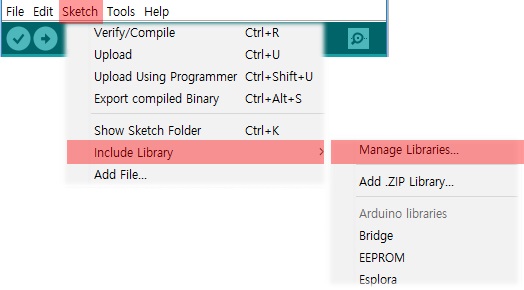
-
Search "phpoc" on the Library Manager.

-
Select the PHPoC library and press the [Install] button.
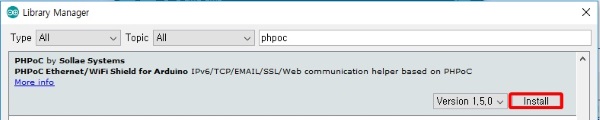
"INSTALLED" message will appear on success.

-
Confirm the "PHPoC" in the [Scketch] > [Include Library] > [Contributed libraries].
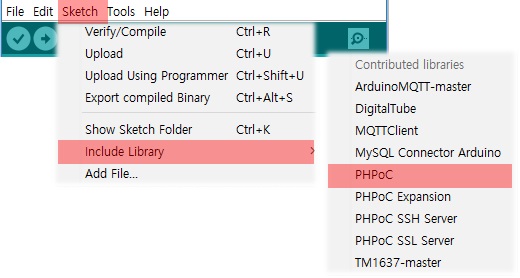
-
Confirm the "PHPoC" in the [File] > [Examples] > [Examples from Custom Libraries].
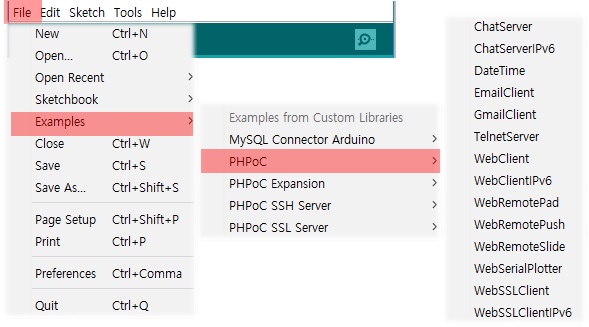
- To run the examples of PHPoC library, follow the instructions of Using the Example.
※ Note : PHPoC Expansion library can be installed in the same way.