User Interface
User Interface
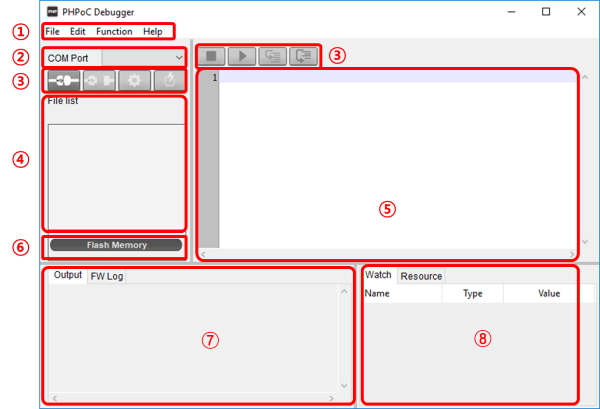
1. Menu bar
| Menu | Sub menu | Description |
|---|---|---|
| File | New | Create a new php file |
| Upload a poc file | Upload a poc format file | |
| Save selected file(s) | Save selected files in file list to local PC | |
| Save a poc file | Save all files in file list to local PC (.poc) | |
| Edit | Undo | Undo the latest job |
| Redo | Redo the latest job undone | |
| Cut | Cut the selected text and copy it to the clipboard | |
| Copy | Copy the selected text to the clipboard | |
| Paste | Paste text from the clipboard | |
| Select all | Select all texts | |
| Find | Find the specified text | |
| Find Next | Find the next text by down direction | |
| Find Previous | Find the next text by up direction | |
| Change | Replace the specified text with given text | |
| Preferences | Program preference | |
| Function | System information | Product/Firmware, Flash files, IP Address, Wireless LAN, ARP/NDC Table, PDB Net |
| Smart expansion board information | Smart expansion board information and Check for updates menu |
|
| View error log | PHP, Firmware, SYS/Stdout tx | |
| Reboot a product | Reboot a product | |
| Firmware Debug mode | Enable/disable Firmware debugging mode | |
| PHP Debug mode | Enable/disable PHP debugging mode | |
| Font | Change font | |
| Language | Change language | |
| Software information | Information about PHPoC Debugger and Check for update button |
|
| help | Debugger manual(online) | Go to PHPoC debugger manual page |
| PHPoC manual(online) | Go to manual page of phpoc.com | |
| Forum | Go to PHPoC forum |
- Preferences
| Menu | Sub menu | Description |
|---|---|---|
| View | View margin | Show/hide margin |
| View line number | Show/hide line number on margin | |
| View current line | Enable/disable current line emphasis | |
| Line ratio | Set line space: 100, 120, 150, 200, 300 |
|
| Tab size | Set tab size: 1, 2, 4, 8, 16 | |
| Action of file add | Internal editor | Use the internal editor |
| External editor | Use an external editor | |
| Ask | Show select option every time | |
| Backup path | Path of backup files and log files | |
| Initialization | Enter initialization mode |
Set product to initialization mode |
| Updating the Debugger | Automatically check | Check for the updates every time debugger runs |
| mDNS service subtype | mDNS service subtype | |
2. COM PORT
Part for choosing a virtual USB COM port
3. Buttons
| Button | Description |
|---|---|
 |
Connect to PHPoC product |
 |
Disconnect from PHPoC product |
 |
Configure environmental values of PHPoC product |
 |
Upload files on [File list] to PHPoC product |
 |
Stop running PHPoC codes |
  |
Run/pause PHPoC codes |
 |
Run line by line |
 |
Run procedure by procedure |
4. File list
List of files saved PHPoC product or to be uploaded.
| Icon | Description |
|---|---|
 |
Synchronized files |
 |
Files on PHPoC product before synchronization |
 |
Files on local PC before synchronization |
 |
Synchronized files on local PC for external editors |
The following menus will be popped up when right clicking on file list area.
| Menu | Description |
|---|---|
| Run | Run the script selected immediately |
| Change the filename | Modify a file name |
| Delete | Delete files on the list |
| File information | Show the information of a selected file |
| New | Create a new php file |
| Add | Add files from local PC |
| Change firmware | Upload the firmware selected to PHPoC |
5. Editor
Showing and editing contents of selected file on the file list. The following menus will be popped up when right clicking on editor area.
| Menu | Description | Shortcut |
|---|---|---|
| Toggle Breakpoint | Set / Unset break point on current line | F9 |
| Remove All Breakpoints | Unset all break points on current file | Shift+F9 |
| Step Into | Run line by line | F11 |
| Step Over | Run procedure by procedure | F10 |
| Run to the current line | Run and pause before executing the current line | - |
| Cut | Cut the selected codes and copy it to the clipboard | Ctrl+X |
| Copy | Copy the selected codes to the clipboard | Ctrl+C |
| Paste | Paste codes from the clipboard | Ctrl+V |
| Select all | Select all codes | Ctrl+A |
6. Flash memory size
This shows currently available or in-use space on flash memory of PHPoC product.
7. Output / FW Log
This window is for displaying standard output and F/W log messages. The following menus will be popped up when right clicking on the windows.
| Menu | Description |
|---|---|
| Delete all logs | Clear screen buffer |
| Copy | Copy the selected log to the clipboard |
| Auto scroll | Set / Unset auto scroll |
| Delete logs at run time | Clear screen buffer every time the script runs |
| Save logs | Save the log in the Output window and FW Log window as a file in the Backup path. |
8. Watch / Resource
This window is for checking run time variable information and system resources. The following menus will be popped up when right clicking on the watch window.
| Menu | Description |
|---|---|
| Add | Add a variable |
| Modify | Modify a name of the selected variable |
| Delete | Delete the selected variables |
| Delete all | Delete all variables |
| Detail | Create a new window for detailed information |